Welcome
Welcome
Intro
1. Main menu
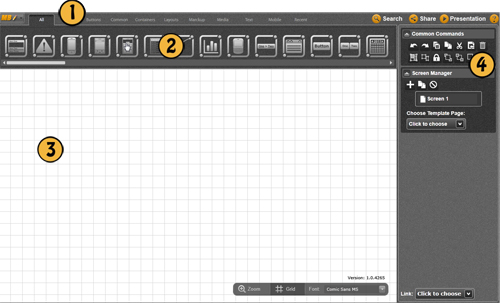
The Main menu in Mockup Builder contains different items you can use. All buttons in menu have similar structure to a typical menu where you may find some standard commands, for example, Open/Close/Save Project. You may edit your Mockup (short command is also available), export screenshots to PNG files, export/import projects and lots of other stuff is also included.
2. UI Library
The UI Library is a long strip of UI Controls just below the Main menu. UI library has a large range of different UI control types that Mockup supports.
Via using the UI Library, customers can put any of the UI elements to the mockup canvas. In this way, customers could use those elements to build a mockup.
Via using the UI Library, customers can put any of the UI elements to the mockup canvas. In this way, customers could use those elements to build a mockup.
3. The Mockup Canvas
The Mockup Canvas is a working area of Mockup Builders, where users make UI mockup more realistic. In Mockup Canvas you may add UI controls, move them and make as many resizes with them as you want.
4. Common commands
The Common Commands includes the same commands as the Edit menu: Cut, Copy, Paste, Delete, Group, Ungroup, and Lock. For better usability users could use keyboard shortcuts. You may find most shortcuts commands in help content.